Cat Coloring Pages V.04: A Practical Resource for Creators and Hobbyists
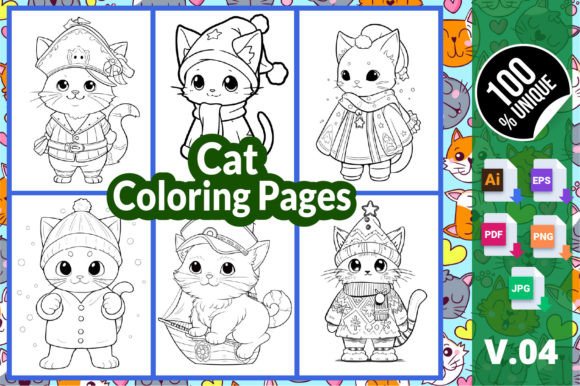
Cat coloring pages have become a staple for both relaxation seekers and content creators. The appeal of feline designs crosses age groups and skill levels, making them a reliable choice for personal enjoyment or commercial projects. Cat Coloring Pages V.04 offers a set of six high-resolution designs packaged in multiple formats, including AI, EPS, PDF, PNG, and JPG files. While the idea of publishing a coloring book on Amazon KDP or printing pages for personal use seems straightforward, many people overlook critical details that can affect the final product. Understanding what you are actually getting and how to prepare it makes the difference between a smooth launch and a frustrating revision cycle.
What Makes Cat Coloring Pages V.04 Different
This particular set includes six distinct cat designs formatted at 8.5 by 11 inches, which is the standard size for both home printers and KDP paperbacks. The inclusion of vector files—AI and EPS—alongside raster formats gives you flexibility that many simpler packs lack. Vector files allow you to resize elements without losing quality, which is useful if you want to adjust the layout or combine pages into a larger collection. The PNG and JPG versions are ready for immediate use, whether you are printing at home, uploading to a print-on-demand service, or sharing digitally. The ZIP file consolidates everything into one download, so you do not have to hunt through multiple folders to find the right format.
What often surprises first-time buyers is that these files are not a finished book. They are individual pages intended to be assembled, organized, and possibly edited before publication. This distinction matters because many assume a set of coloring pages means a ready-to-upload PDF. In reality, you need to arrange the pages, add a cover, and ensure compliance with platform requirements. Approaching the pack as a raw resource rather than a final product sets realistic expectations and prevents last-minute surprises.
Ignoring Bleed and Margin Requirements
One of the most frequent errors involves neglecting Amazon KDP's bleed and margin specifications. The files in Cat Coloring Pages V.04 come in standard 8.5 by 11 inch dimensions, which is the trim size. However, KDP requires a 0.125-inch bleed on all sides if your design extends to the edge of the page. Many people upload the files as-is, only to receive a warning that the content is too close to the trim line. This oversight can delay publication or result in pages being cut off during printing. The fix is simple: extend the background or design slightly beyond the trim area before exporting your final PDF. If your pages have white borders, you can skip the bleed, but you must still maintain safe margins of at least 0.25 inches from the trim edge for content that should not be cut. Taking a few minutes to adjust these settings prevents rejected uploads and ensures the final book looks professional.
Assuming All Formats Are Interchangeable
Another misunderstanding is treating the different file types as identical. The AI and EPS files are vector-based, meaning they store the artwork as mathematical paths. These are ideal for editing individual lines, changing stroke weights, or recoloring elements. The PNG and JPG files are raster images composed of pixels. While they are ready to print, they cannot be easily modified without losing quality. Trying to resize a JPG to a larger page size will result in blurry lines. Knowing when to use each format matters. For example, if you want to adjust the thickness of the outlines to suit different age groups, you should work with the AI or EPS file in vector editing software. If you simply need to print a quick copy for your child, the PNG or JPG is perfectly fine. Choosing the wrong format for your task can lead to extra work or disappointing print quality.
Overlooking Resolution Checks
High-resolution is a phrase that appears in many product listings, but it is worth verifying what that means for your specific use case. Cat Coloring Pages V.04 advertises high-resolution images, which generally means 300 DPI or higher. This is the standard for print quality. However, when you extract files from a ZIP folder and view them on screen, they may appear smaller or pixelated depending on your viewer. Do not judge print quality by on-screen appearance alone. Instead, open the file in an image editor and check the DPI setting in the document properties. For KDP, 300 DPI is required for crisp lines. If you accidentally convert the file to a lower resolution during editing, the final print may look soft or jagged. Maintaining the original resolution throughout your workflow ensures the pages retain their intended clarity.
Customize Before Publishing
The product description recommends making the template your own by adding, deleting, or rearranging pages. This advice is worth taking seriously. A coloring book that contains only six pages feels thin to customers unless the designs are exceptionally detailed or the book is part of a series. Consider combining multiple volumes, adding your own original pages, or including a test page at the beginning. You can also rearrange the order to create a logical flow—perhaps starting with simpler designs and progressing to more intricate ones. If you are selling on KDP, a longer book typically commands a higher price point and feels more substantial to the buyer. Even adding a few pages from other compatible sets can transform a slim booklet into a compelling product.
Test Print Before Committing to a Large Order
Whether you are printing at home or using a service like KDP Print, always test a single page before producing the full batch. Print one design on your home printer using standard paper, then evaluate the line quality, thickness, and overall appearance. Look for areas where the lines may be too thin for markers or too thick for fine pencils. Check that the margins leave enough space for binding. If you plan to sell through KDP, order a proof copy before making the book public. This step catches issues that do not appear on screen, such as color shifts, alignment errors, or paper quality concerns. A single proof copy costs a few dollars and can save you from a batch of unsellable books.
Organize Your Files Systematically
The ZIP file contains multiple formats, which can become confusing if you dump them all into one folder. Create a clear folder structure on your computer. For example, keep separate folders for vector source files, high-resolution PNGs, print-ready JPGs, and your final assembled PDF. Label each file with the page number or design name so you can quickly find what you need. This organization becomes even more important if you are working with multiple volumes or collaborating with other designers. A messy file system leads to mistakes, such as uploading the wrong version or losing edits. Taking a few minutes to set up a logical structure at the start saves time and frustration later.
What to Check Before Downloading or Purchasing
Before you buy any coloring page set, confirm that the license matches your intended use. Cat Coloring Pages V.04 is described as suitable for KDP, which usually means commercial use is allowed, but you should verify the specific terms. Some packs restrict the number of copies you can sell or require attribution. Others allow unlimited commercial use but prohibit reselling the raw files. Reading the license agreement protects you from unintentional violations. Additionally, check that the file formats are compatible with your software. AI and EPS files require vector editing programs like Adobe Illustrator or Affinity Designer. If you do not have access to those tools, the PNG and JPG versions are still usable, but you will lose the ability to customize the vector elements. Knowing your software limitations in advance helps you choose the right pack for your workflow.
Another detail worth examining is the complexity of the designs. The six pages in this set are described as suitable for adults, kids, and kindergarten students. That range implies a mix of simple and detailed illustrations. Look at sample images to determine whether the line work matches the skill level of your audience. Very intricate pages may frustrate young children, while overly simple pages may bore adults. If you are creating a book for a specific age group, consider selecting only the designs that fit that audience or combining pages from multiple sets to achieve the right balance.
Building a Better Coloring Book Experience
Successful coloring books rarely rely on a single set of pages. They combine thoughtful design, clear formatting, and attention to the end user's experience. Cat Coloring Pages V.04 provides a solid foundation with versatile file formats and print-ready dimensions. But the final quality depends on how you prepare the files and what you add to them. Check your margins, maintain resolution, organize your assets, and test before going to print. These steps do not require advanced skills—they simply require patience and attention to detail.
Whether you are creating a coloring book for relaxation, classroom use, or passive income through KDP, the effort you invest in preparation directly affects the result. A well-prepared book with crisp lines, proper margins, and thoughtful page order stands out in a crowded market. By avoiding the common mistakes outlined here, you can transform a simple set of cat coloring pages into a product that looks professional and delivers real satisfaction to the user. Take advantage of the vector files if you have the tools, test your prints, and always double-check the platform requirements before uploading. With the right approach, Cat Coloring Pages V.04 can be a valuable addition to your creative toolkit or your content business.