Shopping Checklist Printable Template: Stay Organized and Save
A trip to the store doesn’t have to feel like a gamble. You walk in, grab what you think you need, and somehow leave with extra snacks, a candle, and a receipt that makes you wince. The Shopping Checklist Printable Template turns that pattern around. It gives you a clean, structured place to write down every item you actually need, plus space for notes so nothing gets forgotten. This isn’t just a list—it’s a small system that helps you stay intentional, cut down on impulse buys, and keep your spending in check.
Whether you’re planning a weekly grocery run, stocking up for a household project, or preparing for a special event, having a printed checklist in hand changes how you shop. You save time because you don’t wander aisles guessing. You save money because you stick to what’s written. And you reduce the mental clutter of trying to remember everything while juggling a cart and a phone.
Let’s explore what makes this template useful, how different people can adapt it, and why it’s more than just a piece of paper.
What the Template Offers Right Out of the Box
The package includes several formats so you can work the way you prefer. You get Ai and Illustrator source files, an EPS file, PDF files ready to print, and a link to Canva Templates. That means if you want to edit the layout, tweak the colors, or add your own headings, you can do it in the software you already use. If you just want to print and go, the PDFs are ready.
You also get multiple sizes: US Letter 8.5 x 11 in, A4 210 x 297 mm, 7.5 x 9.25 in, and 6×9 in. This flexibility matters because you might want a full-page checklist for your binder, a compact size for a small clipboard, or something that fits inside a planner cover. The variety lets you match the template to your physical organizing style, not the other way around.
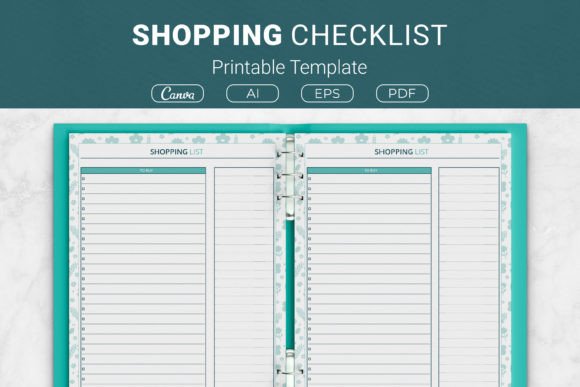
The layout itself includes a list section for items and a notes area. That notes space is easy to overlook, but it’s where you can jot down quantities, brand preferences, price limits, or reminders like “check pantry first” or “bring reusable bags.” Small details like that make the difference between a list you follow and a list that actually works.
Creative Ways to Use the Template Beyond Groceries
Most people immediately think of food shopping, but this checklist adapts to many scenarios. Here are some practical applications that go beyond the typical grocery run.
- Household restocking. Use it to track cleaning supplies, toiletries, light bulbs, batteries, and other essentials you tend to grab randomly. A dedicated checklist prevents buying duplicates and helps you notice when you’re low before you run out.
- Party or event planning. Write down decorations, ingredients, drinks, serving platters, and disposable tableware. The notes section becomes your timing schedule or a list of tasks like “ice at 3 pm” or “set up buffet table.”
- Project shopping. If you’re tackling a DIY renovation, craft project, or home improvement task, list materials, tools, and quantities. Having it on paper means you check each item off as you go, reducing the chance of forgetting that one fitting or connector.
- Office or workspace supplies. For entrepreneurs, freelancers, or small business owners, a shopping checklist keeps inventory organized for printer paper, pens, shipping materials, or breakroom items. It’s especially helpful when you delegate the task to someone else.
- Seasonal or holiday shopping. List gifts, wrapping supplies, greeting cards, and special food items. The notes field can hold budget limits or wrapping preferences for each person.
The template doesn’t care what you’re buying. It just gives you a clear structure. The more you use it, the more you’ll see opportunities to apply it in different contexts.
Adapting for Different Users and Platforms
One of the strengths of this template is how easily it can be customized for different audiences or purposes. If you’re a Kindle Direct Publishing (KDP) creator, this is a strong interior for a planner or organizer. Pair it with other pages like a meal planner, budget tracker, or weekly schedule to create a comprehensive household book. The provided sizes match KDP trim sizes, so you can import the files and set up your manuscript without resizing headaches.
For designers and creators, the included Ai and EPS files let you modify the look to fit a brand. Swap the colors, change the font, add a logo, or adjust the column widths. You can create multiple versions—one for a minimalist audience, another for a playful or colorful style—and sell them as separate products on platforms like Etsy or Gumroad.
Marketers and bloggers can offer the template as a free download or lead magnet to build an email list. A practical, printable resource like this appeals to people looking for organization tools, and the Canva link makes it easy for anyone to personalize without special software. Pair it with a blog post about smart shopping habits or budget-friendly living, and you have a valuable content package.
Educators and hobbyists might use it for classroom supply shopping, field trip preparation, or craft fair planning. The template’s straightforward layout works well for teaching kids about making lists and managing resources, too.
Staying Clear and Effective With Your Checklist
A shopping checklist only works if you use it consistently. Here are some practical ways to keep your results organized and reliable.
Be specific with your items
Instead of writing “vegetables,” write “broccoli, bell peppers, carrots, spinach.” Instead of “snacks,” write “almonds, yogurt tubes, rice crackers.” Specificity eliminates decision fatigue at the store and makes it easier to delegate the shopping to someone else if needed.
Use the notes section for context
This area can hold quantities, price caps, or reminders about what you already have. For example, “only if on sale,” “need 2 packs,” or “check fridge for leftover sauce.” These small prompts prevent overbuying and keep you aligned with your actual needs.
Group items by category or store layout
You can organize your checklist by produce, dairy, cleaning, pantry, and frozen, for example. If you edit the template in Canva or Illustrator, you might create multiple checklists for different store sections. This saves you from crisscrossing the store and cuts shopping time in half.
Set a budget before you write the list
Knowing your spending limit helps you make decisions about what to add or skip. The notes field is a perfect place to write your total budget and keep a running tally as you shop.
Why This Template Helps You Save Time and Money
The connection between a checklist and savings isn’t abstract. When you have a written list, you are far less likely to fall for end-cap displays, impulse bins, or buy-one-get-one deals that don’t actually serve your needs. You walk in with a plan and walk out with exactly the items on your paper.
That said, a checklist also helps you avoid duplicate purchases. How many times have you bought a jar of cumin because you weren’t sure if you had any at home? A quick note in the notes section— “check spice rack first”—prevents that confusion.
Time savings come from focus. Without a list, you might wander aisles trying to recall what you need. With a list, you move deliberately. If you’ve grouped items by category, you can even plan your route through the store for maximum efficiency. Over a month, those saved minutes add up to hours.
Practical Recommendations for Different Formats
Each size in this template serves a different purpose. Here’s how to match the format to your workflow.
- US Letter or A4. Great for a full-size clipboard, a binder, or a refrigerator magnet. Use this when you want a dedicated shopping pad that stays in one place.
- 7.5 x 9.25 in. This fits neatly into many standard planners and notebooks. If you keep a household binder or a disc-bound system, this size works well as an insert.
- 6×9 in. Compact and easy to throw into a handbag, backpack, or car glovebox. Perfect if you prefer to write your list at home and take it with you folded or tucked into a cover.
If you’re creating a KDP planner, offering all four sizes gives customers flexibility and increases the perceived value of your product. For personal use, pick the size that matches your existing organizing system.
Customizing the Template for Your Style
The Canva template link is a huge advantage if you want to make changes without opening design software. Canva runs in a browser, so you can edit on any device. Change the background color, add icons, adjust the font, or insert your own categories. You can create separate versions for grocery shopping, hardware store runs, or holiday planning—all from the same base template.
If you’re comfortable with Illustrator, the source files give you even more control. Adjust the grid, add fields for quantities or prices, or create a two-page spread with a checklist on one side and a notes page on the other. The open-source nature of the files means you are not locked into a fixed design.
Making It Part of a Larger Organization System
A single shopping checklist is useful, but it becomes powerful when combined with other planning tools. Consider pairing it with a meal planner, a weekly budget sheet, or a pantry inventory list. Together, these pages create a complete system for managing household supplies and expenses.
For example, plan your meals for the week, list the ingredients you need, check your pantry and fridge for what you already have, and then write your shopping checklist. When you shop, stick to the list. After shopping, update your inventory. This loop keeps you from overbuying and makes meal prep faster because you always know what you have.
If you’re a KDP creator, bundling these related pages into one book is a natural way to offer value. Shoppers looking for a checklist often want the whole workflow, not just a single page.
Final Thoughts on Using the Shopping Checklist Printable Template
The Shopping Checklist Printable Template is a straightforward tool that delivers real results. It helps you organize your needs, avoid impulse purchases, and manage your spending without adding complexity to your routine. Whether you print it for personal use, customize it for a client, or include it in a published planner, the structure is solid and adaptable.
Start by choosing the size that fits your habit. Fill in your items with specificity. Use the notes section to capture context and limits. The template will do the rest—keeping you focused, efficient, and in control of your shopping list.