Perpetual Calendar KDP Interior for Low-Content Publishing
If you are building a low-content or no-content book business on Amazon KDP, you have likely discovered that efficiency and quality determine how fast you scale. A Perpetual Calendar KDP Interior offers a ready-made, reusable template that eliminates repetitive design work while delivering a polished product buyers actually want. Unlike dated planners, a perpetual calendar works for any year, which makes it an evergreen asset in your catalog.
This article walks through what a perpetual calendar interior is, why it matters for publishers and creators, how to use it across different markets, and what to look for when choosing a template. Whether you are just starting out or have dozens of titles already listed, understanding this format can help you grow sustainably.
What Is a Perpetual Calendar KDP Interior?
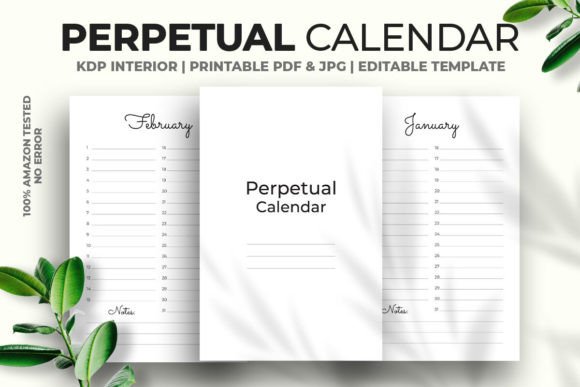
A perpetual calendar interior is a pre-designed PDF template formatted specifically for Amazon KDP upload. It contains a calendar layout that repeats across all months but never goes out of date because it does not reference a specific year. Users can write in the dates themselves, or you as the publisher can reuse the same file year after year without updating anything.
The version described here is a 6 x 9 inch, 120-page interior with no bleed, fully vector editable in Adobe Illustrator, and includes a high-resolution JPG at 300 DPI. It has been tested on Amazon KDP with no errors, which means you can upload it directly without worrying about formatting rejections.
Because the file is vector-based, you can resize it, adjust margins, tweak colors, or add your own branding elements without losing quality. This makes it suitable not only for Amazon KDP but also for print-on-demand services, local printing, or digital downloads on platforms like Etsy or Gumroad.
Key Characteristics That Matter for Publishers
Several qualities set a well-built perpetual calendar interior apart from generic templates you might find for free online.
Fully Vector Editable PDF
A vector PDF means every element — lines, text boxes, decorative borders — is mathematically defined rather than pixel-based. You can open the file in Adobe Illustrator and change the size, rearrange elements, or apply a new color palette in minutes. This is especially useful if you want to offer the same calendar in multiple sizes (for example, 6 x 9, 8.5 x 11, or A4) without rebuilding it from scratch.
No Bleed and Ready to Upload
No-bleed formatting simplifies the upload process on KDP. You do not need to worry about trimming marks or extended backgrounds. The interior is already set to standard trim size specifications, so what you see in the PDF is exactly what will print. Combined with prior testing on Amazon KDP, this removes the guesswork and reduces the risk of upload errors that can delay publication.
High-Resolution Output
With 300 DPI JPG and PDF outputs, the interior prints cleanly without pixelation. This matters more than many new publishers realize. Low-resolution interiors look fuzzy when printed, and customers notice. A sharp, professional interior builds trust and encourages positive reviews.
120 Pages of Usable Content
120 pages provides enough room for monthly spreads, weekly overviews, or a combination of both, depending on how you design the interior. It also hits a sweet spot for production cost. You can price the book competitively while maintaining a decent profit margin. For a perpetual calendar, 120 pages suggests generous space for notes, goals, or habit tracking alongside the monthly grids.
Practical Applications Across Different Environments
A perpetual calendar interior is surprisingly versatile. It works in personal, professional, educational, creative, and commercial contexts.
For Personal Use and Home Organization
Many individuals buy perpetual calendars to track family schedules, appointments, birthdays, or recurring tasks. Because the calendar never expires, they can use it year after year. If you publish this interior as a paperback or spiral-bound notebook, you are offering something that stays relevant on a desk or kitchen counter indefinitely.
A practical example: a parent might use the monthly spreads to track school holidays, extracurricular activities, and meal planning. The perpetual format means they do not have to buy a new planner every December.
For Professionals and Entrepreneurs
Business owners, freelancers, and consultants often use perpetual calendars for project planning, content calendars, or client scheduling. A clean, minimal interior works well for this audience. You can customize the template with subtle branding elements — like a logo on the cover or a company name in the footer — and use it as a client gift, promotional item, or internal tool.
If you sell digital downloads, this interior can be offered as a printable PDF for professionals who prefer to plan on paper but want a timeless layout.
For Educators and Trainers
Teachers, tutors, and workshop facilitators can use a perpetual calendar for lesson planning, curriculum mapping, or scheduling sessions. The 120-page interior provides enough room for an entire academic year plus notes sections. Since the calendar is undated, educators can start using it at any point in the year without wasting pages.
You could also create a version with lined or dotted note pages interspersed between monthly spreads, though that would require modifying the vector file. The flexibility of a vector PDF makes such customization straightforward.
For Creatives and Hobbyists
Artists, writers, and makers often keep creative journals or project planners. A perpetual calendar interior can serve as the backbone of a bullet journal-style notebook, especially if the layout is minimal enough to allow hand-lettering, stickers, or decorative elements. The 6 x 9 inch size is portable and fits easily into a bag or desk drawer.
If you run an Etsy shop selling digital printables, this interior can be repackaged as a downloadable planner. The high-resolution JPG and vector PDF give buyers the freedom to print at home or at a local print shop.
For Low-Content Book Businesses
This is where the template shines most directly. If you are publishing on Amazon KDP, you can use the perpetual calendar interior as a standalone product or as part of a series. Because it is tested and ready to upload, you can list it quickly. Over time, you can create variations — different cover designs, color themes, or sizes — all based on the same vector file.
One realistic strategy: publish a black-and-white version first, then release a full-color version with decorative covers for holidays, seasons, or niche interests (like gardening, fitness, or travel). Each variation takes minimal additional design time because the interior structure is already built.
Benefits Related to Usability and Efficiency
Using a perpetual calendar interior offers several practical advantages beyond just saving design time.
Usability — The user does not need to cross out or skip months. They start whenever they want and write in the dates. This lowers the barrier to purchase because the product is immediately useful, regardless of when someone buys it.
Efficiency — For the publisher, one file can generate multiple products. Change the cover, tweak a color, export in different sizes, and you have a new listing without redoing the interior layout. Over a year, that efficiency compounds significantly.
Appearance — A vector-based interior with clean typography and consistent spacing looks professional on print. Customers are more likely to leave positive reviews when the layout feels intentional and polished.
Branding — You can add your own logos, taglines, or color schemes to create a consistent brand across multiple publications. Over time, buyers may recognize your style and return for other titles.
Engagement — Perpetual calendars invite interaction. Users fill in dates, add notes, and personalize the pages. That hands-on engagement increases the perceived value of the book and makes it less likely to be returned.
Practical Considerations When Selecting or Using This Interior
Before you upload or customize, here are a few things to keep in mind.
Check the File Format Compatibility
The interior is a vector PDF that opens with Adobe Illustrator. If you do not have Illustrator, you may need alternatives like Affinity Designer, Inkscape (free), or CorelDRAW. Make sure you have the right software before purchasing. The included high-resolution JPG can serve as a fallback if you only need to preview or print directly.
Consider Your Target Audience
A perpetual calendar appeals to people who want a reusable planning tool. If your audience prefers dated planners with specific year references, this may not fit. However, for most low-content niches — gratitude journals, habit trackers, meal planners — the perpetual format works well because buyers are looking for flexibility.
Think About Binding and Cover
The interior is no-bleed and print-ready, but you still need a cover. Plan to create or purchase a separate cover file that complements the interior. If you offer a paperback on KDP, the cover design can make or break the listing. For spiral-bound versions, you may need to adjust the interior margins to account for binding.
Test a Proof Copy
Even though the file is tested on KDP, ordering a physical proof is always a good practice. Check that margins look balanced, that the 6 x 9 trim size feels right in hand, and that the paper quality matches your expectations. Small adjustments to the vector file can be made before you go live.
Plan for Variations
Because the interior is vector-based, consider creating a few variations upfront. For example, a minimalist version, a floral-themed version, and a professional monochrome version. You can reuse the same layout and just swap out decorative elements or colors. This approach builds a small catalog quickly without starting from scratch each time.
Observations from Experience
Over the past decade working in print and digital media, I have seen publishers waste enormous amounts of time rebuilding interiors for each new book. The most successful low-content publishers treat their interiors as systems, not one-off designs. A perpetual calendar interior is exactly that kind of system. Once you have a solid vector file, you can produce dozens of listings with minimal incremental effort.
The 100% tested on Amazon KDP claim matters more than you might think. KDP can reject files for subtle issues like margin violations, font embedding problems, or color space mismatches. A pre-tested file saves hours of troubleshooting. If you are publishing multiple books, that time adds up fast.
Another observation: perpetual calendars often get better long-tail search traffic than dated planners. People search for "undated calendar," "perpetual planner," "evergreen calendar," and similar terms throughout the year. Dated planners spike in November and December, then drop off. A perpetual calendar maintains steadier demand, which helps stabilize your income.
Final Recommendations
If you are serious about growing a low-content publishing business, consider adding a perpetual calendar interior to your product line. Start with one well-tested template, get it live on KDP, and then iterate. Use the vector file to experiment with different cover styles, niche themes, or bonus pages. Each variation is a new opportunity to reach a different audience without reinventing the wheel.
For creators and professionals who simply want a reliable planning tool, this interior provides a clean, professional foundation. You can use it as-is or adapt it to your personal workflow. The 120-page count gives you room to expand, and the perpetual format ensures you will never outgrow it.
Whether you are publishing for profit, selling digital downloads, or organizing your own life, a perpetual calendar interior offers practical value that lasts far beyond a single year.