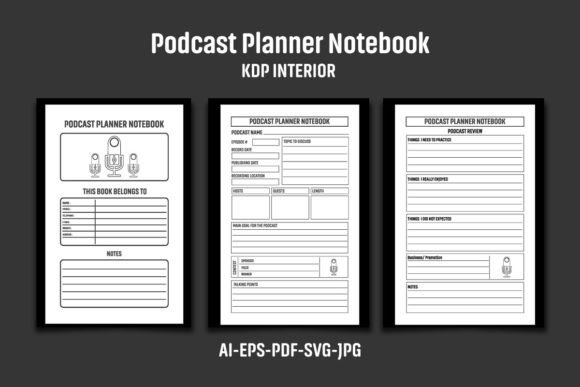
Podcast Planner Notebook KDP Interior for Creators
If you run a podcast—or help others run one—you already know how much planning happens before the mic ever turns on. Episode ideas, guest research, sponsorship notes, schedule coordination, and topic outlines can pile up fast. That is exactly where a dedicated Podcast Planner Notebook KDP Interior comes into play. Rather than juggling random sticky notes or digital documents scattered across apps, a structured planner gives you a single space to manage your show from concept to publication.
This interior file is designed specifically for self-publishers building their Amazon KDP catalog. Whether you are a seasoned publisher looking for fresh niches or a creator wanting to produce your own planner for sale, understanding what makes this interior valuable can save you time and help you deliver a better product.
What Makes a Podcast Planner Notebook KDP Interior Useful
At its core, this interior is a ready-to-use set of pages formatted for a 6″x9″ paperback book. You get an AI file, EPS file, PDF, three JPG files, and an SVG file—all compressed into one ZIP archive. The PDF alone contains 110 pages of black-and-white, high-resolution content (300 DPI). The dimensions include bleed (6.12 x 9.25 inches), which is the standard requirement for print-on-demand platforms like Amazon KDP.
But beyond the technical specs, the real value lies in what those 110 pages can hold. A podcast planner notebook can include episode logs, guest contact sheets, interview question templates, sponsorship trackers, show notes outlines, and publication calendars. The interior structure gives you a foundation you can customize with your own branding, logo, or graphic elements before uploading.
Why Formatting Matters for Print-on-Demand
When you publish on KDP, the interior file must meet specific print requirements. Bleed dimensions ensure that content reaches the edge of the page after trimming. The 300 DPI resolution guarantees sharp text and clean lines, which is especially important for a planner where users will write notes by hand. The black-and-white design keeps printing costs low, making the final product affordable for buyers.
Because the interior is delivered in multiple formats—AI, EPS, PDF, JPG, and SVG—you can edit it using Adobe Illustrator (CS6 or later), Affinity Designer, or even free tools like Inkscape. This flexibility is particularly useful if you want to adjust page layouts, add sections, or change the order of pages before uploading.
Practical Applications Across Different Environments
A well-structured podcast planner is not just for solo podcasters. Its use cases span professional, educational, creative, and even commercial settings. Here are some realistic scenarios where this interior shines.
For Solo Creators and Hobbyists
If you host your own show—whether as a side project or serious business—you need a system to track recurring tasks. A typical episode might require brainstorming topics, researching guests, drafting questions, recording audio, editing, writing show notes, and scheduling promotion. Without a planner, it is easy to forget a step or let ideas slip away. With 110 pages, you can dedicate a spread to each episode, log publication dates, and note what worked and what did not.
For Professional Podcasters and Entrepreneurs
Podcasts have become a legitimate marketing channel for businesses, coaches, and consultants. If you use your show to build authority or generate leads, you may also need to track sponsorship agreements, affiliate links, and call-to-action performance. A dedicated planner helps you keep that information organized over multiple seasons. You can include a section for revenue tracking, guest follow-ups, and content repurposing ideas.
For Educators and Trainers
Teachers, professors, and trainers sometimes use podcasts as supplementary learning tools. A planner can help them structure episodes around curriculum topics, align content with learning objectives, and schedule releases around academic calendars. The clean, black-and-white interior works well for printing multiple copies for students or workshop participants.
For Freelancers and Agencies
If you manage podcasts for clients, a planner becomes a project management tool. You can use it to track each client’s brand voice, episode ideas, approval deadlines, and publishing milestones. Having everything in one physical notebook (or a digital version printed from the PDF) reduces the risk of mix-ups between different shows.
For Marketers and Bloggers
Podcasters often repurpose episodes into blog posts, social media snippets, YouTube videos, and email newsletters. A planner with dedicated space for repurposing ideas makes this process systematic. You can note which episodes performed best, which topics generated the most engagement, and what formats your audience prefers.
Key Strengths of This Interior File
Several qualities make this particular interior stand out for KDP publishers.
- Complete file set: Having AI, EPS, PDF, JPG, and SVG gives you maximum flexibility. You can edit vector elements in Illustrator, use the PDF for direct upload, or preview pages with the JPG files.
- Bleed included: The 6.12 x 9.25 inch dimension with bleed means your pages will print correctly without white borders after trimming.
- 110 pages of content: This is enough for a substantial notebook. You can offer a robust product that feels valuable to customers, not a thin booklet.
- High resolution (300 DPI): Text and lines remain crisp, which is critical for a planner where users will write by hand.
- Black and white design: Lower print costs mean you can price your notebook competitively while maintaining a healthy margin.
- Editable vector formats: AI and EPS files (CS6 version) let you rearrange, add, or remove pages as needed.
How to Use the Interior for Your KDP Publishing Business
The files come compressed in a single ZIP archive. You will need to extract them using WinZIP, WinRAR, or by double-clicking on most modern operating systems. Once extracted, you can open the AI or EPS file in a vector editing program.
Before uploading to KDP, add your own logo, branding, or unique graphic elements to the interior pages. This step is important because Amazon flags duplicate content if multiple publishers upload the exact same file. Even a small change—like adding a footer with your brand name or a subtle watermark—makes the interior unique to you.
The images, text, and mockups shown in the product listing are for presentation only. They are not included in the ZIP file. You are responsible for creating your own cover design and any additional marketing materials. The interior itself gives you a clean, professional foundation to build upon.
Practical Tips for Customization
To get the most out of this interior, consider these recommendations:
- Add section dividers: Use the editable format to insert title pages between sections (e.g., Episode Ideas, Guest Contacts, Sponsorships, Notes). This improves usability for the end customer.
- Include a table of contents: For a 110-page book, a contents page helps users navigate quickly. You can add page numbers after finalizing the layout.
- Adjust line spacing: If you prefer wider or narrower ruled lines for handwriting, modify the templates in Illustrator before exporting the final PDF.
- Create multiple versions: Since you own the editable files, you could produce a podcast planner for different niches—interview-style shows, solo episodes, story-driven podcasts, or educational series.
Benefits for User Experience and Branding
A well-crafted podcast planner does more than organize information. It also builds trust and authority. When customers purchase your notebook, they are investing in a system that helps them stay consistent. Consistent podcasters grow their audience faster and generate more reliable content. By providing a tool that supports that consistency, you position yourself as a knowledgeable publisher within the podcasting niche.
The black-and-white interior also appeals to buyers who prefer a clean, minimalist aesthetic. Without distracting colors or decorative graphics, the focus stays on the content—the user’s own ideas and plans. This understated design works well for professionals who want a serious, no-frills planning tool.
Furthermore, because the interior is high resolution, even small text remains legible. This is important for contact details, website URLs, or notes written in small handwriting. The 6″x9″ size is large enough to write comfortably but compact enough to carry in a bag or keep on a desk without taking up too much space.
Observations and Recommendations for Publishers
If you are new to KDP publishing, this interior is a solid starting point. The podcast niche has a dedicated audience that actively seeks organizational tools. Many podcasters are also content creators who appreciate well-designed notebooks. By offering a planner tailored to their workflow, you tap into a motivated customer base.
One observation worth noting: the interior is delivered without any pre-filled content or examples. This means you have complete creative control. You decide what each page asks the user to fill in. You might design pages for episode brainstorming, guest research, interview questions, recording notes, editing logs, show notes outlines, promotion checklists, and reflection prompts. The blank canvas allows you to tailor the notebook to a specific type of podcaster.
For example, an interview-style podcast might need more guest contact pages, while a solo show might benefit from more brainstorming and script space. A story-driven podcast could include story arc mapping sections. Consider your target audience and build the layout around their recurring tasks.
Another practical consideration: because the files are in AI and EPS format (CS6 version), you need a compatible vector editor. If you do not have Adobe Illustrator, free alternatives like Inkscape or Affinity Designer can open EPS files, though you may need to test compatibility. The included PDF can be used as a fallback, but editing is more limited without a vector program.
Pricing and Positioning
Given the production cost advantages of a black-and-white interior (no color printing costs), you can price your podcast planner competitively. Many similar notebooks on Amazon sell in the $8.99–$14.99 range depending on page count, cover design, and brand reputation. With 110 pages, your notebook offers substantial value. A well-designed cover combined with a practical interior can justify a mid-range price point.
You might also consider offering a series of podcast planners—one for beginners, one for advanced hosts, and perhaps a guest interview edition. The editable file set makes it easy to produce variations without starting from scratch each time.
Final Thoughts on Using This Interior
The Podcast Planner Notebook KDP Interior is more than a collection of pages—it is a foundation you can adapt to meet a specific audience’s needs. Whether you are building your first KDP product or expanding an existing catalog, this interior saves you the time of designing a layout from zero. The multiple file formats, high resolution, and bleed-ready dimensions give you professional-quality output with room for personalization.
By adding your own branding and tailoring the content to a particular podcast style, you create a unique product that stands out in a growing marketplace. Podcasters appreciate tools that respect their workflow and help them stay organized. If you deliver that, you build trust and repeat customers.
Remember to always customize the interior before uploading to avoid duplicate content flags. Use the editable formats to make the planner yours, and focus on the real-world needs of the people who will use it. That approach, combined with a solid interior like this one, sets you up for a successful KDP publishing experience.