Project Planner V2: A Complete KDP Interior Solution
If you have spent any time researching Amazon KDP interiors, you know that the difference between a product that sells and one that collects dust often comes down to presentation, structure, and versatility. Project Planner V2 is a KDP-ready interior designed to help you organize tasks, track milestones, and manage workflows without the fluff. Whether you are a publisher, a business owner, a freelancer, or someone who simply wants to keep projects on track, this interior offers a practical foundation that balances structure with flexibility.
This article walks through what Project Planner V2 actually is, why it might be useful for your specific needs, and how you can put it to work across personal, professional, educational, creative, and commercial contexts. No hype. Just real observations and actionable considerations.
What Is Project Planner V2?
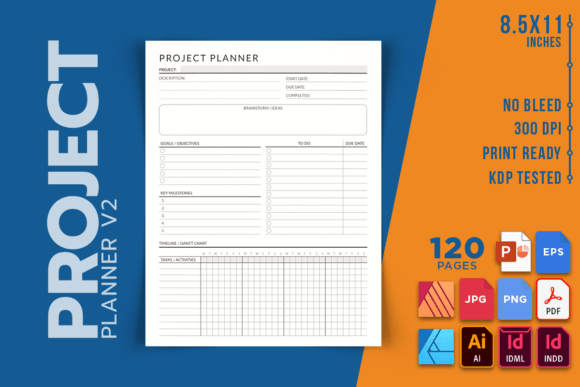
Project Planner V2 is a print-ready interior file designed specifically for Amazon KDP publishing. It provides a framework for planning, tracking, and managing projects of various sizes and scopes. The interior is formatted at 8.5 x 11 inches, spans 120 pages, and is delivered at 300 DPI with no bleed, making it straightforward to upload and print through KDP or your local print shop.
What sets this version apart is the range of editable source files included. You get INDD, IDML, AI, PDF, PNG, JPEG, EPS, AFDESIGN, AFPUB, and PPTX formats. That means you can customize the layout, swap out fonts, adjust colors, or rebrand the entire planner before publishing. For publishers and creators who want to offer something unique rather than a generic template, this level of flexibility matters.
The interior itself is structured to help users break down larger goals into manageable sections, track progress over time, and stay accountable. It is not a complicated system. It is a practical tool that works best when you have clear objectives and need a visual way to organize the steps in between.
Key Characteristics and Strengths
Several qualities make Project Planner V2 a solid choice for both creators and end users.
Clean, Print-Ready Formatting
The file arrives at 300 DPI with no bleed, which means text and graphics will appear crisp on paper without unexpected cropping. For anyone who has dealt with rejected KDP uploads due to bleed issues, this is a time-saver. The 8.5 x 11 inch size is also a standard format that prints cleanly at home or at a professional shop, and it fits well into binders or report covers for office use.
120 Pages of Usable Space
At 120 pages, the planner is substantial enough to cover a quarter or a season of work without feeling overwhelming. It is not so long that users give up halfway through, nor so short that it runs out before a project is complete. That balance is deliberate and practical for real-world use.
Multiple File Formats for Customization
This is perhaps the strongest selling point for publishers. With source files in InDesign, Illustrator, Affinity Publisher, PowerPoint, and several image formats, you can edit the interior to match your brand, adjust the layout for specific audiences, or even repurpose the design for other products. You are not locked into a single software ecosystem, and you do not need advanced design skills to make changes if you stick with PPTX or PDF editing.
KDP-Ready Quality
The high-quality PDF is optimized for Amazon KDP requirements. This eliminates a lot of the guesswork around margins, resolution, and file size. If you are publishing a planner for the first time, this reduces the friction of technical formatting so you can focus on content and marketing.
Practical Applications Across Different Contexts
One of the reasons Project Planner V2 works well is that it does not force a one-size-fits-all approach. The layout is adaptable to multiple environments.
Personal Project Management
For individuals, the planner works well for tracking personal goals like home renovations, event planning, or learning a new skill. If you are planning a wedding, organizing a move, or mapping out a fitness challenge, the structure gives you space to break down each phase and check off completed steps. The act of writing things down physically, rather than relying solely on digital apps, often improves follow-through.
Professional and Small Business Use
Freelancers, contractors, and small business owners can use the planner to manage client deliverables, track deadlines, and monitor budgets. For example, a freelance graphic designer might use the pages to outline each phase of a branding project, from research through final delivery. A consultant could map out milestones for a six-month client engagement. The physical format also works well in meetings where taking notes on a laptop can feel impersonal or distracting.
Educational and Academic Settings
Educators, tutors, and students can adapt the planner for coursework, thesis projects, or semester planning. A teacher coordinating a curriculum unit might use it to sequence lessons and assessments. A graduate student working on a dissertation could map out research phases, writing goals, and submission deadlines. The structure provides clarity during long, multi-step academic projects where it is easy to lose sight of the big picture.
Creative and Content Projects
Bloggers, YouTubers, podcasters, and writers often juggle multiple content pieces at once. Project Planner V2 can help map out editorial calendars, production schedules, and launch timelines. If you are working on a book manuscript, the planner can serve as a chapter-by-chapter tracker. For a marketing campaign, you can outline content assets, distribution channels, and review dates. Creative work benefits from the same discipline that construction or engineering projects use, and this planner provides that structure without dampening creativity.
Commercial Publishing and Reselling
For KDP publishers looking to build a product line, this interior can be rebranded and republished under your own cover. Because the source files are editable, you can customize the title, add your logo, adjust color schemes, and tailor the content to a niche audience. You could create versions for real estate agents, wedding planners, fitness coaches, or nonprofit coordinators. The 120-page count keeps printing costs reasonable while offering enough value to justify a competitive price point.
Usability, Efficiency, and Communication Benefits
Beyond the obvious organizational advantages, Project Planner V2 offers several benefits that improve how people work and communicate.
Reduces Decision Fatigue
When you have a predefined layout for planning, you spend less time deciding how to structure your thoughts and more time acting on them. The planner provides prompts and sections that guide the user naturally through the planning process. This is especially helpful for people who feel overwhelmed at the start of a large project.
Improves Team Communication
If you share your planner pages with a team or a client, the consistent format makes it easier to communicate progress. Everyone sees the same layout, the same milestones, and the same deadlines. This reduces misunderstandings and keeps conversations focused on what needs to happen next rather than on interpreting messy notes.
Supports Accountability and Follow-Through
Writing down tasks and checking them off provides a sense of accomplishment that digital checklists sometimes lack. The physical act of recording progress also makes it harder to ignore overdue items. Over the course of a project, this small reinforcement loop can make a real difference in completion rates.
Works Offline and On
Because it is a printed interior, the planner works anywhere, regardless of internet access. That matters for fieldwork, site visits, conferences, or simply working in environments where screens are impractical. It also gives your eyes a break from constant screen time, which many professionals appreciate.
Realistic Examples and Use Cases
To help you see how this might play out in practice, here are a few realistic scenarios.
A freelance event coordinator managing three weddings in one season could use one planner per event. Each page would hold vendor contacts, timeline checkpoints, budget tracking, and notes from client meetings. At 120 pages, there is enough space for detailed planning without needing a separate notebook for each client.
A marketing team at a small agency could print copies for each member and use the planners during weekly check-ins. The consistent format means everyone tracks the same metrics and milestones, making status updates faster and more accurate.
A high school teacher coordinating a cross-curricular project between science and history classes could use the planner to map out joint lessons, coordinate due dates, and track student progress. The structured approach helps ensure that both classes stay aligned despite different schedules.
A KDP publisher could customize the interior for a specific niche, such as "Real Estate Flipping Planner" or "Nonprofit Grant Writing Planner," add a professional cover, and publish it as a standalone product. The editable source files make this customization straightforward, even for someone with basic design software skills.
Practical Considerations When Using Project Planner V2
Before you purchase or publish this interior, there are a few things worth keeping in mind.
Consider your audience. The planner works best for people who prefer structured, linear planning. If your audience leans toward freeform journaling or mind-mapping, you may need to adjust the layout or pair it with additional materials.
Check the file format compatibility. While the wide range of included formats covers most use cases, verify that your editing software supports the file type you plan to use. If you are working with an older version of InDesign, for example, the IDML format is there for a reason. Use it.
Plan your cover separately. This interior does not include a cover. You will need to create your own or purchase one separately. Factor that into your production timeline and budget.
Test a print sample. Before publishing at scale, print one copy at home or through a local shop to verify that the layout meets your expectations. Check margins, font legibility, and overall feel. A sample print will reveal issues that a screen preview cannot.
Think about binding. The 8.5 x 11 inch size with no bleed works well for spiral binding, comb binding, or simply three-hole punching for a binder. If you plan to offer a perfect-bound paperback through KDP, confirm that the interior formatting aligns with KDPs specific trim and margin guidelines for that binding style.
Customize thoughtfully. If you edit the source files, keep the user experience in mind. Avoid cluttering the pages with excessive branding or decorative elements that reduce the usable space. The strength of this interior is its clean, functional layout. Let that functionality shine.
Final Observations
Project Planner V2 is not a revolutionary system, and it does not need to be. What it offers is a reliable, well-formatted structure for organizing work that many people already do. For KDP publishers, the editable source files and print-ready formatting reduce the friction of bringing a product to market. For end users, the planner provides a tangible tool for staying organized in an increasingly digital world.
The best uses for this interior come from matching its structure to a specific need. Whether you are managing personal goals, leading a team, teaching a class, or building a publishing business, the planner gives you a clean canvas to work with. Take the time to customize it for your audience, test your print setup, and use it consistently. That is where the real value lives.