200 Editable Sheets Fall Journal for Canva
Autumn brings a natural shift in energy. As the days shorten and the air turns crisp, many of us feel a pull toward reflection, planning, and intentional creation. Whether you are a content creator mapping out the next quarter, an educator preparing seasonal materials, or a small business owner refreshing your branding, the right set of tools can make all the difference. The 200 Editable Sheets Fall Journal offers exactly that kind of practical, flexible resource. Designed for Canva and usable with only a free account, this collection of 200 editable sheets gives you a complete fall-themed journal system without requiring a design subscription or advanced software skills. Let's walk through what this resource actually delivers, how it works, and where it fits into real workflows.
What the 200 Editable Sheets Fall Journal Actually Is
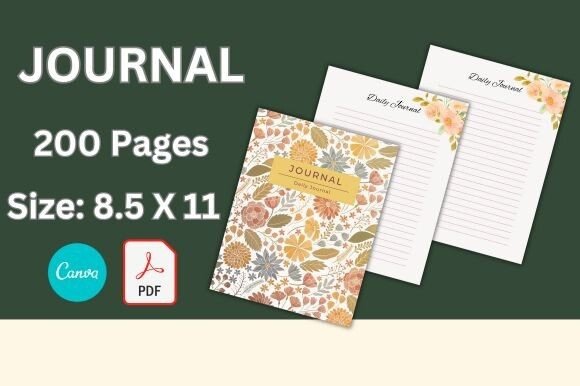
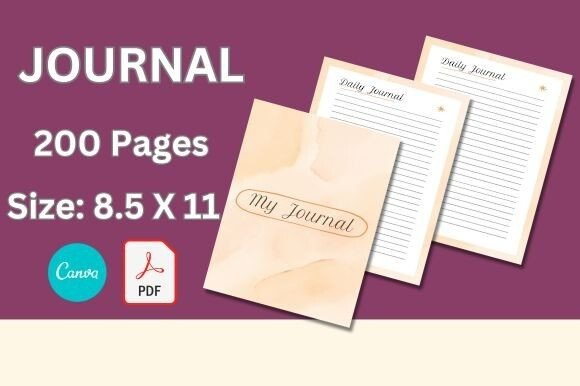
At its core, this is a digital package of 200 individual journal sheets, each formatted to US letter size (8.5 x 11 inches) with full bleed. The file arrives as a clickable PDF list. Instead of scrolling through endless thumbnails or guessing which template you need, you simply choose the file you want to work on directly from that list. It is straightforward and time-saving.
Each sheet features a clean, simple lined layout. The design leans into fall aesthetics—warm tones, subtle seasonal motifs, and high-quality original artwork—without overwhelming the content area. The lines are clear and usable, whether you plan to print and write by hand or keep everything digital. Because these sheets are fully editable in Canva, you can change colors, swap in your own fonts, adjust line spacing, or add images and branding elements. The 200 Editable Sheets Fall Journal acts as a foundation you can customize rather than a fixed template you must accept as-is.
Editable in Canva with a Free Account
This is not a locked-down PDF or a proprietary format. You edit everything inside Canva, and you do not need a Canva Pro subscription to do so. A completely free account gives you full access to modify the text, colors, layout, and art. That lowers the barrier significantly for freelancers, educators, and hobbyists who do not want another monthly expense. It also means you can collaborate with team members or clients inside Canva without worrying about license restrictions.
Clickable PDF List for Easy Navigation
Managing 200 sheets could feel chaotic, but the clickable PDF list solves that. You see the full inventory organized in one document. Clicking a link opens the specific sheet you want to edit. This matters when you are working under a deadline and need to quickly locate a gratitude log, a weekly planner, or a project tracker without digging through folders.
US Letter Size with Bleed
At 8.5 x 11 inches with bleed, these sheets are ready for professional printing. If you plan to print journals for clients, sell bound copies, or produce your own personal notebook, the bleed ensures that background colors and artwork extend to the edge of the page after trimming. Print-ready dimensions save you prep time and help avoid misalignment issues.
Simple Lined Layouts with High-Quality Art
The linework is clean and unobtrusive. The original art appears as accents rather than heavy background graphics, so the sheets remain functional for writing while still feeling polished. This balance between decoration and utility is harder to find than you might expect. Many free templates bury content under dense ornamentation; here, the design supports the writing rather than competing with it.
Personal Use: Reflection, Planning, and Habit Tracking
Autumn naturally invites introspection. You might use the 200 Editable Sheets Fall Journal to build a daily gratitude practice, track seasonal goals, or simply capture thoughts during a quieter season. The lined pages work well for bullet journaling, morning pages, or evening reflection. Because you can customize each sheet, you might set up a habit tracker on one page and a weekly review on the next, maintaining visual consistency throughout the journal.
For those who prefer analog writing, print the sheets and bind them at home or take them to a local print shop. For digital users, import the edited sheets into Goodnotes, Notability, or similar apps and write directly on the pages with a stylus.
Professional and Business Environments
Small business owners and entrepreneurs often need branded materials that feel seasonal without being kitschy. The 200 Editable Sheets Fall Journal lets you apply your brand colors and logo across all 200 pages. Use sheets for client planning sessions, quarterly goal mappings, content calendars, or team brainstorming notes. The fall theme adds a touch of seasonal relevance that can resonate with your audience if you share your process on social media or offer printed journals as client gifts.
Marketers and bloggers can repurpose these sheets as lead magnets. Offer a limited set of fall-themed planning pages as a free download in exchange for email sign-ups. Because the sheets are editable, you can tailor them to your niche—whether that is meal planning, fitness tracking, or content strategy.
Educational and Classroom Settings
Educators teaching in person or online can use the journal sheets for student activities, reflection prompts, or organizational tools. The fall design works especially well for September through November. You might create reading logs, vocabulary sheets, or nature observation pages that align with autumn lessons. Since the sheets are simple lined, younger students have enough structure, while older students appreciate the clean aesthetic.
Homeschooling parents will also find these useful for building custom curriculum materials. Print multiple copies of a single sheet type or create a complete fall-themed portfolio for the quarter.
Creative and Digital Content
Content creators on YouTube, Instagram, or Pinterest need visually consistent materials for videos, posts, and downloads. The 200 Editable Sheets Fall Journal provides a cohesive base for digital content. You can film a setup video using printed pages, share downloadable versions with your audience, or create social media graphics that preview individual sheets. The high-quality original art photographs well and translates to digital screens without looking pixelated.
Freelance designers can use these sheets as a starting point for client projects. Instead of building a journal layout from scratch, you customize an existing foundation and deliver a finished product in less time. The clickable PDF list helps you quickly locate the layouts that match the client's needs.
Benefits Related to Usability and Efficiency
The most immediate benefit is time saved. Starting from a blank Canva canvas for each of 200 pages would take hours. Starting from a coordinated set with pre-applied design elements cuts that preparation to nearly zero. You focus on content and customization rather than layout and alignment.
Consistency is another advantage. When all 200 sheets share a unified design language, the final journal feels intentional and professional. Whether you produce one journal for yourself or hundreds for a client, the visual flow remains coherent.
Flexibility with a free account removes financial friction. Many high-quality journal templates require a Canva Pro subscription to access premium elements. This collection works entirely within the free tier, which means anyone with an internet connection can start editing immediately.
Print readiness with bleed eliminates guesswork for those who want physical copies. You do not need to manually adjust margins or worry about white edges after trimming. The dimensions are standard, so local print shops and online services handle the files without issues.
Realistic Examples and Use Cases
- A freelancer creates a branded fall planner for her design business. She edits each sheet to include her logo, changes the accent colors to match her brand palette, and offers the planner as a free download to newsletter subscribers. The clickable PDF list lets her navigate directly to the weekly and monthly spreads without scrolling through irrelevant pages.
- A classroom teacher builds a fall journal pack for his students. He selects 30 sheets from the 200, customizes the headers to match his curriculum, and prints a set for each student. The simple lined design works for writing prompts, spelling practice, and creative writing assignments. He repeats the process each week, choosing different sheet types from the collection.
- A small business owner prepares a seasonal gratitude journal as a customer gift. He prints 50 copies at a local shop, adds a branded cover separate from the set, and presents them at a fall networking event. Recipients appreciate the high-quality paper and thoughtful design. The bleed ensures no awkward white borders after trimming.
- A content creator films a journal setup video using the 200 Editable Sheets Fall Journal. She shows viewers how she customizes the sheets in Canva, prints them, and binds them with a simple stapler or disc system. The video generates engagement because viewers can recreate the exact same look with a free Canva account.
Practical Considerations When Using This Resource
When you open the clickable PDF, make sure you make a copy in your own Canva account of any document you want to edit. Working directly on the original file can cause issues if you need to revert changes or if multiple people access the same link. Canva's interface makes copying straightforward, and this habit protects your work.
The fall theme is seasonal, so consider how far you want to lean into autumn aesthetics. If you plan to use the journal year-round, you might adjust colors and remove overtly seasonal elements. The editable nature of the sheets allows for that, though you will need to invest a little extra time if you want a neutral base.
For printing, test a single page on your chosen paper stock before running the full set. Some home printers handle bleed settings differently, and a test page helps you catch alignment issues early. If you plan to bind the sheets, remember that the left margin needs to accommodate binding type—stapling, spiral, or ring binding each require different margins. You can adjust margins in Canva before printing.
Finally, think about how you will organize 200 sheets. The clickable PDF list helps, but you might want to create folders or categories within your Canva account to group similar sheets together. A little upfront organization saves time later.
Who Benefits Most from the 200 Editable Sheets Fall Journal
Professionals juggling multiple projects will appreciate the efficiency and print-ready dimensions. Creators and entrepreneurs who need branded materials will value the customization options and consistent design. Educators preparing seasonal content will find the varied layouts adaptable for different age groups. Hobbyists who enjoy journaling or planning will enjoy the freedom to print as many copies as they want without recurring costs. And for anyone who has hesitated to build a custom journal because of software costs or design complexity, the free Canva requirement removes those barriers entirely.
The 200 Editable Sheets Fall Journal fills a specific niche: it offers volume, quality, and flexibility in a package that respects your time and budget. Whether you are printing a personal notebook, creating a client deliverable, or building digital content for an audience, this collection gives you a solid foundation to work from. And because you can edit everything, the final product can feel uniquely yours while still carrying that warm, inviting character that makes autumn materials so appealing.